Posts

Showing posts with the label Design

An Easier Way to Decide

Image
Originally posted on ForeverCar Blog:  https://blog.forevercar.com/an-easier-way-to-decide You probably have far more important priorities than taking the time to research vehicle service protection plans. That’s where we come in. When we set out to create the latest innovation to our consumer shopping platform, we vowed to keep it simple. If you are not shopping for vehicle service protection at  forevercar.com , you are likely sitting across the desk from a loan officer at a bank or a finance manager at a dealership. There are a couple problems we've identified with this scenario: It’s bad timing.  You are typically involved in a larger, more complex loan transaction involving your vehicle. Taking the necessary time to research the offering is impractical and highly unlikely to happen in that moment. That’s why most people pass on vehicle protection at the bank or dealership. Wrong amount of detail.  There’s a lot to this. A service contract is ...

How to start a product redesign - a playbook

Image
A few months back I was working on a large, ground-up redesign for a product I own. I had a little trouble getting started. I realized I needed a playbook to remind me of the basics. I am sharing my playbook for those who are having trouble and procrastinating getting started. Enjoy. Before you start At the highest level, in one paragraph, what is a representative user's goal and the problem you are solving for them?  If you can't answer this succinctly you have many, many features or you don't know your users well enough to continue.  Slow down, answer #1 for each feature set before you go to #2. What's working for them now? What's not? What you need to design for them Verify you are building all the tools they need. Show the process they will use to reach goal - give them a map or trail to follow. Indication of progress toward the user's goal - "You are here" Make sure you build in escape hatches because they find a better way....

Call It Like It Is - Save Time and Money by Filtering Out Non-Users in Your Application's Design

Image
At UrbanBound we are  necessarily obsessed with who our users are - and who they aren't. An application designed for baby boomers utilizes very different design principals than one designed for a younger audience. If we try to design for everybody (the lowest common denominator) we just aren't going to be compelling enough to anybody. We keep a visual reminder posted of who we are, and who we deliberately aren't, build for. This way we don't waste time and limited resources on people who aren't likely to work with us.

Why car companies need to do usability testing

Image
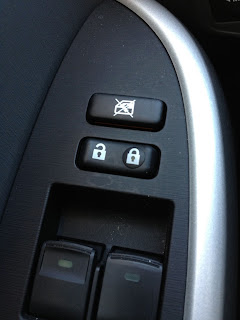
Overall I love my Toyota Prius. Under the hood, it is an engineering marvel. Prius' have been around for 10 years and still sell like hotcakes.  I honestly don't understand why Ford hasn't made a competing product by now. I have come to realize that I pay attention to design more than the average person. I hate it when simple design mistakes ruin an overall well designed product. The interior of my Prius has some obvious problems that could have easily been fixed had they asked the right questions. Separation of Concerns Is there any reason they needed to put the door lock/unlock button between the buttons that operate the windows?   The buttons feel different - therefore its not likely that I'm going to press the wrong button. However, nearly every time I want to use one one of the buttons I have to take my eyes off the road and look at the buttons to choose the correct one or I have to feel each one to get the correct one. This simply violates the principa...

Jakob Nielsen's Kindle Fire Usability Findings

I don't like to re-post, but I highly recommend reading this. Tablets are, finally , not going to go away and will only increase in usage. Jakob Nielsen does a great job of discussing the usability and design of 7-inch tablets. Then he talks about the future of 7-inch tablets based on the market and design choices required to ensure their future. http://www.useit.com/alertbox/kindle-fire-usability.html

Everyone hates gadgets! Don't make your product a gadget

Image
Photo Credit: Librarian By Day My mother sent me the following comment in a email recently: "Us senior citizens don't need anymore gadgets. The tv remote and the garage door remote are about all we can handle." I find the concept of gadgets interesting. I don't consider myself a gadget person.  However, I own an iPad and Android phone. My brother owns quite a few portable technology devices, but doesn't consider any of them gadgets. My mother owns a digital camera, mobile phone, and iPod. These devices are more complex than a TV remote or garage door opener, but are not gadgets to her. They are useful tools. The line between gadget and useful thing is how useful the owner finds it.   This is something to keep in mind when designing. If somebody can find clear utility in your product they will spend time learning how to use it. You can increase your customer retention by focusing on clear workflows, usability, and tracking customer behavior. If you can't...

Boarding Pass - You're doing it wrong

Image
Boarding Pass or Billboard?